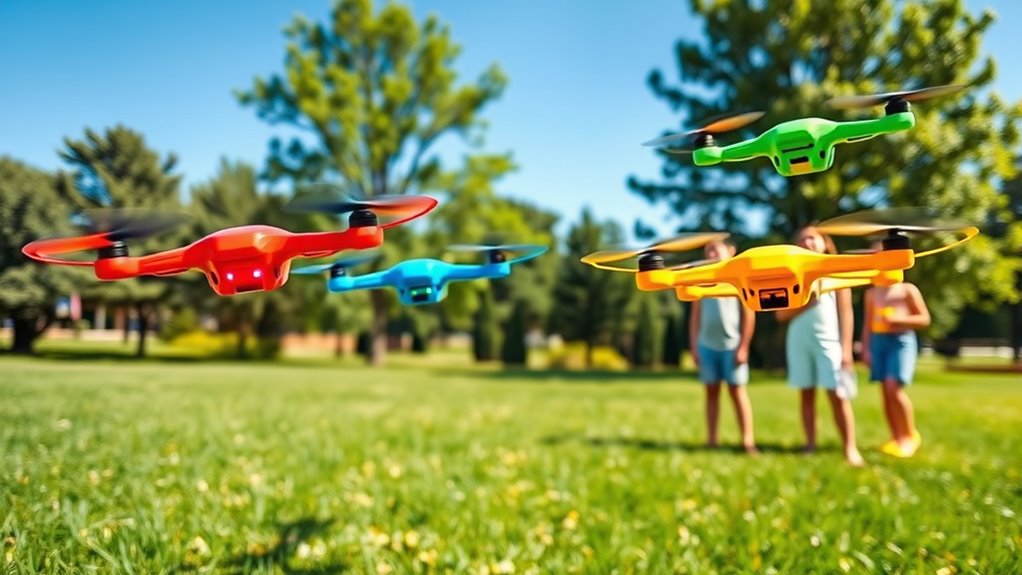

Premium remote control drones for kids balance easier controls and protective features with extras such as cameras, screens, and GPS. I’d put the K600GPS Foldable GPS Drone first for families who want GPS features and an adjustable camera, while the Beginner Drone with 2K Camera and 4.3-Inch Screen Controller stands out for its built-in viewing screen. For younger beginners who mainly want indoor flight, the SYMA X100 is a simpler alternative. The main tradeoff is between a more capable camera setup and a drone that is easier to learn and maintain. Read on for how the 13 options compare and which one fits your child’s age, flying space, and priorities.

Get cleaning gear delivered free with Prime
- Fast, free delivery on millions of items
- Prime Video, Amazon Music and more included
- Member-only deals all year
Complete the kit


Key Takeaways
- The K600GPS is the clearest feature-rich pick: GPS, a foldable design, an adjustable UHD camera, and a controller display give it a broader feature set than the mini indoor models.
- A controller screen changes the setup: Several models include a built-in display, which can avoid relying on a phone, though buyers should check how the screen works before choosing.
- Camera resolution is only one part of the choice: The 2K camera models stand out on paper, while 1080p options with a display may be easier to frame and view.
- Indoor-first drones serve a different purpose: The SYMA X100 and Holy Stone HS210 prioritize beginner-friendly, compact flying over GPS or camera features.
- Foldable designs add portability, not automatic durability: Many picks fold for storage, so families should still check spare propellers, guards, battery availability, and repair options.
| Swifsen SWA35 Mini Camera Drone for Kids | 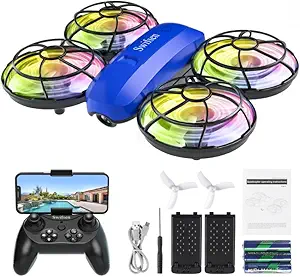 | Best for First Flights | Brand and model: Swifsen SWA35 | Skill level: Beginner | Camera resolution: 720p | VIEW ON AMAZON | See Our Full Breakdown |
| Drones for Kids with 1080P Camera,Remote Control RC Quadcopter for Beginner |  | Best for Camera and App Play | Camera resolution: 1080p | Live viewing: App-based FPV | Flight modes: Three speed settings, headless mode, altitude hold | VIEW ON AMAZON | See Our Full Breakdown |
| Beginner Drone with 2K Camera and 4.3-Inch Screen Controller |  | Best Built-In Screen Pick | Camera: 2K HD with 90° adjustable lens | Controller screen: 4.3 inches | Motor: Brushless | VIEW ON AMAZON | See Our Full Breakdown |
| SYMA X100 Indoor Drone for Kids |  | Best for Indoor Safety | Obstacle avoidance: Four-way infrared sensors; detect obstacles within about 12 inches | Propeller protection: Fully enclosed guard | Body material: ABS | VIEW ON AMAZON | See Our Full Breakdown |
| K600GPS Foldable GPS Drone with 4.5-Inch Display Controller and Adjustable UHD Camera |  | Best Premium GPS Features | Display: 4.5-inch non-touch HD screen | Camera: 90° adjustable UHD lens | Weight: 205 g | VIEW ON AMAZON | See Our Full Breakdown |
| 1080P Drone with Camera for Kids & Adults Beginners, Foldable FPV Quadcopter with One Key Takeoff/Landing, Gesture Control, 360° Flips, 2 Batteries, Toy Gift for Teen Boys and Girls |  | Best for App-Based Play | Video resolution: 1080p | Still resolution: 2 MP | Camera adjustment: Up to 90° | VIEW ON AMAZON | See Our Full Breakdown |
| G3 Foldable Drone with 1080p Camera and Display Controller |  | Best for Phone-Free Viewing | Camera resolution: 1080p | Camera adjustment: 90° vertical | Controller display: Built-in HD display | VIEW ON AMAZON | See Our Full Breakdown |
| Holy Stone HS210 Mini Drone for Kids and Beginners, Blue |  | Best for Indoor Beginners | Model: HS210 | Weight: 50 g | Dimensions: 3.15 × 3.15 × 1.18 in | VIEW ON AMAZON | See Our Full Breakdown |
| Loiley Foldable 2K Camera Drone for Beginners |  | Best for Camera Detail | Camera resolution: 2K | Still resolution: 2.2 MP | Camera angle: 90° adjustable | VIEW ON AMAZON | See Our Full Breakdown |
| Foldable FPV Drone with 1080p Camera and 4.5-Inch LCD Remote |  | Best for Screen-Based FPV | Video resolution: 1080p | Still resolution: 2 MP | Remote screen: 4.5-inch LCD | VIEW ON AMAZON | See Our Full Breakdown |
| Foldable FPV Drone with 1080p Camera and Remote Control |  | Best for Longer Practice Sessions | Camera: 1080p HD with 80° adjustable lens | Flight time: Up to 25 minutes | Batteries: Two enhanced batteries | VIEW ON AMAZON | See Our Full Breakdown |
| Drone with Camera for Kids and Beginners, 4.5-inch Screen Remote, Two Batteries |  | Best for Phone-Free Live Viewing | Controller screen: 4.5-inch screen | Camera: Live-view camera; resolution not specified | Motors: Brushless | VIEW ON AMAZON | See Our Full Breakdown |
| PK01 Foldable FPV Drone with 1080p Camera and Controller Screen |  | Best Premium Screen-and-Camera Package | Camera: 1080p HD with 80° adjustable lens | Controller: Remote with built-in screen | Motors: Brushless | VIEW ON AMAZON | See Our Full Breakdown |
| premium remote control drones for kid | Batteries | Flight time |
|---|---|---|
| Swifsen SWA35 Mini Camera Dron | — | About 15 minutes |
| Drones for Kids with 1080P Cam | 2 × 500mAh | Up to 10 minutes per battery |
| Beginner Drone with 2K Camera | 2 rechargeable lithium-ion | — |
| SYMA X100 Indoor Drone for Kid | 2 rechargeable batteries | — |
| K600GPS Foldable GPS Drone wit | — | — |
| 1080P Drone with Camera for Ki | 2 rechargeable batteries | Up to 30 minutes total |
| G3 Foldable Drone with 1080p C | 2 included | Up to 25 minutes |
| Holy Stone HS210 Mini Drone fo | 3 included | Up to 21 minutes |
| Loiley Foldable 2K Camera Dron | 2 | Approximately 26 minutes |
| Foldable FPV Drone with 1080p | — | — |
| Foldable FPV Drone with 1080p | Two enhanced batteries | Up to 25 minutes |
| Drone with Camera for Kids and | Two | About 10 minutes per battery |
| PK01 Foldable FPV Drone with 1 | Two included | Up to 25 minutes |
More Details on Our Top Picks
Swifsen SWA35 Mini Camera Drone for Kids
I’d put the Swifsen SWA35 near the top for a child learning basic flight controls. One-touch takeoff, altitude hold, and headless mode reduce the number of things a new pilot has to manage at once, while the propeller guard offers some protection during indoor practice. Its 720p camera is a modest step down from the 1080p camera on the Drones for Kids with 1080P Camera, so this is more about building confidence than capturing sharper footage. Two modular batteries make it easier to resume flying after a swap, though the stated 60-foot range and roughly 15 minutes of flight time keep sessions close and short. I’d choose it for simple, supervised practice; kids wanting longer flights or more camera-focused play should look elsewhere.
Pros:- One-touch takeoff, altitude hold, and headless mode make early flights easier to manage.
- Propeller guard adds protection during practice.
- Two modular batteries allow a swap between sessions.
- Flips, rotation, and colorful lights add play value beyond basic hovering.
Cons:- Recommended flight range is limited to 60 feet.
- About 15 minutes of flight time limits each outing.
- 720p camera resolution is lower than the 1080p option on the Drones for Kids with 1080P Camera.
Best for: Younger first-time pilots who want simple controls, a propeller guard, and a second battery for supervised practice close to home.
Not ideal for: Kids who want to fly across a large outdoor area or spend more time recording video; the recommended range is 60 feet and flight time is about 15 minutes.
- Brand and model:Swifsen SWA35
- Skill level:Beginner
- Camera resolution:720p
- Maximum range:60 feet
- Flight time:About 15 minutes
- Included batteries:2
- Weight:13.1 ounces
- Dimensions:6 × 5 × 1.5 inches
Our verdict“Choose the SWA35 for a child’s first close-range flights, but pick a camera-focused model if sharper footage matters more than simple practice.”
Drones for Kids with 1080P Camera,Remote Control RC Quadcopter for Beginner
The 1080P camera and app-based live view give this drone a more camera-centered role than the Swifsen SWA35, whose listed camera captures 720p video. Gesture photo and video controls add another way for kids to interact with the camera, while three speed settings, headless mode, and one-key takeoff and landing offer room to adjust as skills grow. Two 500mAh batteries are included, with up to 10 minutes of flight time each, so a battery swap can extend an outing. The tradeoff is that the lightweight design can be affected by gusts, and the description does not give a flight range or the screen-free viewing experience of the Beginner Drone with 2K Camera and 4.3-Inch Screen Controller. I’d favor it for phone-owning families who want flight and camera features in one package.
Pros:- 1080p camera and app-based FPV provide live viewing on a phone.
- Gesture photo and video controls add camera interaction.
- Three speed settings can suit different confidence levels.
- Two 500mAh batteries provide up to 10 minutes each.
Cons:- Lightweight construction can be affected by gusts.
- Live viewing depends on app and phone use.
- No flight range is provided in the supplied product data.
Best for: Families with a compatible phone who want a beginner quadcopter with app-based live viewing, gesture capture, and adjustable speed modes.
Not ideal for: Children who need a controller with its own screen or expect steady outdoor flights in breezy conditions; the product advises flying in a wind-free open area.
- Camera resolution:1080p
- Live viewing:App-based FPV
- Flight modes:Three speed settings, headless mode, altitude hold
- Takeoff and landing:One-key takeoff and landing
- Batteries:2 × 500mAh
- Flight time:Up to 10 minutes per battery
- Camera controls:Gesture photo and video
- Included accessories:Remote control, USB charging cable, screwdriver, wrench, extra propellers
Our verdict“Pick this model for phone-based camera play and flexible speed settings, while the built-in-screen Beginner Drone with 2K Camera is a better fit for flying without a phone.”
Beginner Drone with 2K Camera and 4.3-Inch Screen Controller
For a child curious about aerial footage, this model pairs a 2K camera with a 4.3-inch controller screen, so live viewing does not depend on a separate phone. That makes it a more self-contained camera setup than the Drones for Kids with 1080P Camera, which relies on app viewing, while two batteries provide up to 30 minutes of total flight time across a session. Beginner controls such as one-key takeoff and landing, altitude hold, and headless mode help keep the feature set approachable; the brushless motor is another notable hardware distinction in this group. The screen does not replace a memory card: a MicroSD card is not included, and some features require app control. I’d pick it for families who value on-controller viewing over the GPS flight modes in the K600GPS.
Pros:- Built-in 4.3-inch screen shows live footage without a phone.
- 2K camera has an adjustable 90° lens.
- Two batteries provide up to 30 minutes of total flight time.
- Includes a carrying case, spare propellers, and protective guards.
Cons:- MicroSD card for recording is not included.
- Some flight features require app control.
- At 140 g, it is heavier than the 13.1-ounce Swifsen SWA35 is listed in ounces, so buyers should check handling expectations for their child.
Best for: Families who want a child to view live camera footage on the controller and have two batteries for longer practice sessions.
Not ideal for: Buyers who want recording ready out of the box or prefer a drone whose listed features are all accessible without an app; the MicroSD card is separate and some features require app control.
- Camera:2K HD with 90° adjustable lens
- Controller screen:4.3 inches
- Motor:Brushless
- Total flight time:Up to 30 minutes
- Batteries:2 rechargeable lithium-ion
- Weight:140 g
- Dimensions:8.1 × 6.4 × 2.3 inches
- Special features:360° flips, headless mode, one-key return, altitude hold, trajectory flight, gravity control, gesture control
Our verdict“Choose this drone if controller-based viewing and longer combined flight time matter more than GPS modes or ready-to-record storage.”
SYMA X100 Indoor Drone for Kids
The SYMA X100 is the clearest indoor pick in this batch: its fully enclosed propeller guard and four-way infrared sensors are aimed at play in rooms where open flight space is limited. One-button takeoff and landing, altitude hold, and headless mode keep the controls simple, while two speed settings let a beginner start gently. Compared with the Swifsen SWA35, it offers a more enclosed guard and obstacle sensing, but the SYMA is designed for indoor use and does not list a camera. Up to 20 minutes across two batteries gives it more stated total flight time than the SWA35’s roughly 15 minutes, though actual time varies. I’d choose it for supervised indoor flying and skip it if the child’s main goal is aerial photos or outdoor range.
Pros:- Fully enclosed propeller guard helps limit blade contact.
- Four-way infrared sensors detect obstacles within about 12 inches.
- One-button takeoff and landing plus altitude hold simplify early flying.
- Two batteries provide up to 20 minutes of total flight time.
Cons:- Designed for indoor play rather than outdoor range.
- No camera is listed in the supplied product data.
- Flight time varies with use.
Best for: Families seeking a beginner drone for supervised indoor play, especially where an enclosed propeller guard and obstacle sensing are priorities.
Not ideal for: Children who want camera footage, outdoor flights, or a model for covering distance; the X100 is designed for indoor play and no camera is listed.
- Obstacle avoidance:Four-way infrared sensors; detect obstacles within about 12 inches
- Propeller protection:Fully enclosed guard
- Body material:ABS
- Controls:One-key takeoff and landing, altitude hold, headless mode
- Speed modes:2
- Stunts:One-key 360° flips
- Batteries:2 rechargeable batteries
- Total flight time:Up to 20 minutes
Our verdict“Choose the SYMA X100 for protected indoor practice, but look to the Swifsen SWA35 or a camera-equipped option for footage and outdoor-oriented play.”
K600GPS Foldable GPS Drone with 4.5-Inch Display Controller and Adjustable UHD Camera
The K600GPS has the most advanced flight aids in this group, including GPS-assisted return home, Follow Me, and Circle Fly. Those features make it a more ambitious pick for families who want guided outdoor-style flight than the indoor-focused SYMA X100, which prioritizes enclosed blades and obstacle sensing. A 4.5-inch controller display also lets a child view live video without relying on a phone, and the foldable body and carrying case make transport easier. Its 90° adjustable UHD camera and support for a 32 GB SD card suit families interested in recording, though the card is not stated as included. The controller screen is non-touch, and the listed maximum range of 400 km is difficult to interpret alongside the separate 3,280-foot flight-range figure. I’d treat range claims cautiously and choose this for its GPS modes and integrated display.
Pros:- GPS-assisted return home, Follow Me, and Circle Fly add guided flight options.
- Built-in 4.5-inch display provides live viewing without a phone.
- Foldable design and carrying case simplify transport.
- Adjustable UHD camera and support for a 32 GB SD card suit recording-focused use.
Cons:- Controller display is non-touch.
- The supplied data lists both up to 3,280 feet of flight range and a 400 km maximum range, which may be difficult to interpret in real-world use.
- A modular battery is listed, but no flight-time figure is provided.
Best for: Families with an older or confident beginner who wants GPS-assisted flight modes, controller-based viewing, and a foldable camera drone.
Not ideal for: Younger children who mainly need protected indoor practice, or buyers expecting a simple touch interface; the X100 is better geared to indoor safety and this controller screen is non-touch.
- Display:4.5-inch non-touch HD screen
- Camera:90° adjustable UHD lens
- Weight:205 g
- Flight range:Up to 3,280 feet
- Maximum range:400 km
- Storage support:32 GB SD card
- Battery and charging:Lithium-ion modular battery; Type-C charging
- Flight features:GPS, return home, Follow Me, Circle Fly, altitude hold, headless mode, one-key takeoff and landing
Our verdict“Pick the K600GPS for GPS flight modes and an integrated display, provided its range figures and single listed battery fit your expectations.”
1080P Drone with Camera for Kids & Adults Beginners, Foldable FPV Quadcopter with One Key Takeoff/Landing, Gesture Control, 360° Flips, 2 Batteries, Toy Gift for Teen Boys and Girls
App-powered variety gives this foldable drone a broader play set than the more straightforward Holy Stone HS210. Alongside one-key takeoff, altitude hold, and three speed settings, its app adds trajectory flight, Follow Me, gravity control, and gesture selfies, so a beginner can start with simple controls and try more interactive features later. The 90° adjustable 1080p camera and phone-based FPV add casual photo and video options, while two batteries are said to provide up to 30 minutes total flight time.
The tradeoff is that several headline features depend on a phone and app, while the HS210 is more clearly suited to uncomplicated indoor practice. Its camera is listed at 2 MP for stills, and the stated flight time is split across two batteries. I’d choose this for a child who wants camera play and app modes; families prioritizing a simpler, smaller indoor flyer should compare the HS210.
Pros:- App offers trajectory flight, Follow Me, gravity control, and gesture selfies.
- One-key takeoff and landing, altitude hold, headless mode, and three speed levels support gradual learning.
- Two batteries are specified for up to 30 minutes of combined flight time.
- Foldable design, carrying case, and propeller guards support transport and practice.
Cons:- Still images are listed at 2 MP despite the 1080p video label.
- FPV and several play modes rely on a phone and companion app.
- The stated flight time is divided between two batteries rather than a single long session.
Best for: Families with a beginner aged 8–13 who wants app-controlled flight modes, gesture selfies, and casual camera use.
Not ideal for: Buyers seeking a simple indoor-only starter drone or high-detail still photography; the app adds setup and the still resolution is 2 MP.
- Video resolution:1080p
- Still resolution:2 MP
- Camera adjustment:Up to 90°
- Flight time:Up to 30 minutes total
- Batteries:2 rechargeable batteries
- Weight:230 g
- Connectivity:Wi-Fi
- Special features:Gesture control, altitude hold, Follow Me, trajectory flight, 360° flips
Our verdict“Pick this for a young beginner who values app-based tricks and casual camera play more than simple indoor flying or sharper still photos.”
G3 Foldable Drone with 1080p Camera and Display Controller
The G3’s built-in controller display is its clearest distinction: a child can view and play back footage without mounting a phone, a more self-contained setup than the phone-based FPV on the 1080P Drone with Camera for Kids & Adults Beginners. Its 1080p camera tilts vertically, and optical flow positioning is intended to help the drone hold position, which can make early practice less demanding. Brushless motors and two included batteries add to its feature set, with up to 25 minutes of flight time stated.
That convenience comes with limits. The 30-meter maximum range is modest, and saving footage requires an SD card that is not included. Compared with the Loiley Foldable 2K Camera Drone, the G3 gives up the higher listed camera resolution in exchange for a screen integrated into the controller. It suits families who want a standalone viewing setup, but less so children focused on longer-range flying or ready-to-use recording.
Pros:- Built-in controller display supports live viewing and playback without a phone.
- Optical flow positioning is designed to help maintain a steadier hover.
- Two batteries are included for up to 25 minutes of stated flight time.
- Foldable design and brushless motors add portability and a more feature-rich setup.
Cons:- Maximum stated range is 30 meters.
- An SD card is required for storage and is not included.
- Its 1080p camera has a lower listed resolution than the Loiley model’s 2K camera.
Best for: Families who want a child to view and replay drone footage on the controller without relying on a phone.
Not ideal for: Buyers who want longer-range flights or to record immediately without sourcing a separate SD card.
- Camera resolution:1080p
- Camera adjustment:90° vertical
- Controller display:Built-in HD display
- Flight time:Up to 25 minutes
- Batteries:2 included
- Motors:Brushless
- Positioning:Optical flow
- Maximum range:30 meters
- Storage:SD card required; not included
Our verdict“Choose the G3 for phone-free viewing and beginner-oriented positioning, provided its short stated range and separate SD card requirement suit your plans.”
Holy Stone HS210 Mini Drone for Kids and Beginners, Blue
Small-scale indoor practice is the HS210’s strength. At 50 g and about 3.15 inches across, it is far more compact than the foldable camera drones in this group, including the Loiley Foldable 2K Camera Drone. Altitude hold, headless mode, adjustable speed, and toss-to-launch keep the learning curve approachable, while propeller guards help protect the drone during close-quarters practice. Three batteries are specified for up to 21 minutes total flight time, so a child can swap batteries instead of ending a session after one short run.
This is the pick for learning basic control in a room, not for outdoor camera exploration. Though the supplied data lists 1080p video and Wi-Fi, the product is framed as an indoor mini quadcopter, and its small size and 160-foot maximum range set a different expectation from the Loiley’s foldable camera-oriented setup. I’d skip it if adjustable camera framing or outdoor versatility is the priority.
Pros:- Compact 50 g body suits indoor practice and is easy to carry.
- Altitude hold, headless mode, adjustable speed, and toss-to-launch support new pilots.
- Three batteries provide up to 21 minutes of stated combined flight time.
- Propeller guards and 3D flips add protection and simple stunt play.
Cons:- Its indoor-focused mini design is less suited to outdoor camera exploration.
- Maximum stated range is 160 feet.
- It lacks the adjustable camera framing offered by the Loiley and other foldable camera drones.
Best for: Children and first-time pilots who need a compact, guarded drone for indoor control practice.
Not ideal for: Families shopping for a portable outdoor camera drone with adjustable framing; this model is positioned for indoor flying.
- Model:HS210
- Weight:50 g
- Dimensions:3.15 × 3.15 × 1.18 in
- Flight time:Up to 21 minutes
- Batteries:3 included
- Battery capacity:250 mAh
- Maximum range:160 feet
- Video resolution:1080p
- Special features:Altitude hold, headless mode, toss-to-launch, 360° flips, auto-landing
Our verdict“Pick the HS210 for a child learning basic controls indoors, and choose a foldable camera model if outdoor footage is the main goal.”
Loiley Foldable 2K Camera Drone for Beginners
The Loiley is the camera-led option here: its 2K camera and remotely adjustable 90° angle offer more scope for framing than the 1080p cameras on the G3 Foldable Drone and the 1080P Drone with Camera for Kids & Adults Beginners. Optical flow positioning, altitude hold, and one-key takeoff and landing keep the feature set approachable for a beginner, while Wi-Fi live view lets the pilot see what the camera sees. Two batteries are specified for approximately 26 minutes of combined flying.
There is a tradeoff between the 2K video label and the 2.2 MP still resolution; buyers focused on sharp photos should temper expectations. The flight time is also shared across both batteries, not a single uninterrupted session. For a family that wants a foldable starter with camera framing and live view, this makes more sense than the HS210, which is oriented toward compact indoor practice. Skip it if flight simplicity matters more than camera features.
Pros:- 2K camera with remote 90° adjustment offers flexible framing.
- Optical flow and beginner controls support more manageable practice.
- Two batteries provide approximately 26 minutes of combined flight time.
- Foldable body, carrying bag, and propeller guards support transport and practice.
Cons:- Still image resolution is 2.2 MP, which limits photo detail.
- Approximately 26 minutes is the combined time across two batteries.
- Wi-Fi live view and camera features add setup compared with the simpler HS210.
Best for: Beginner families who want a foldable drone with adjustable camera framing and Wi-Fi live view for casual footage.
Not ideal for: Buyers expecting high-resolution still photography or one long uninterrupted flight from the stated battery time.
- Camera resolution:2K
- Still resolution:2.2 MP
- Camera angle:90° adjustable
- Flight time:Approximately 26 minutes
- Batteries:2
- Folded size:5 × 3 × 2 in
- Connectivity:Wi-Fi
- Positioning:Optical flow
- Skill level:Beginner
Our verdict“Choose the Loiley when adjustable camera framing matters more than still-photo detail or the HS210’s stripped-back indoor focus.”
Foldable FPV Drone with 1080p Camera and 4.5-Inch LCD Remote
The 4.5-inch LCD remote makes this a natural fit for families who want live viewing without pairing a phone. That gives it a similar convenience to the G3 Foldable Drone, while this model specifies electric 90° camera tilt and local storage on the controller. Its foldable, lightweight body, spare propellers, and storage bag make it easy to pack for a park outing, and Wi-Fi/app control gives families an alternative way to connect.
The listing specifies 1080p video but only 2 MP still images, so I’d treat it as a casual FPV camera rather than a photography tool. Unlike the G3, the supplied details do not give a flight-time figure or a positioning system, making battery planning and hover expectations less clear. It suits buyers who value an integrated viewing screen, but the Loiley offers a stated flight duration and higher video resolution for camera-first use.
Pros:- 4.5-inch LCD remote supports viewing without a phone.
- Electric 90° camera adjustment helps change the view remotely.
- Controller supports local storage, avoiding reliance on phone storage.
- Foldable design includes spare propellers and a storage bag.
Cons:- Still images are listed at 2 MP.
- The supplied product details do not state flight time.
- Positioning support is not specified, unlike the optical flow systems listed for the G3 and Loiley.
Best for: Families who want a foldable beginner drone with a built-in screen for phone-free FPV viewing.
Not ideal for: Camera-first buyers who need higher still detail, a stated flight-time estimate, or clearly specified positioning support.
- Video resolution:1080p
- Still resolution:2 MP
- Remote screen:4.5-inch LCD
- Camera tilt:90° electric adjustment
- Motors:Brushless
- Connectivity:Wi-Fi
- Battery:1500 mAh lithium-ion
- Weight:6.4 oz
- Dimensions:5.5 × 3.6 × 2.2 in
Our verdict“Pick this for screen-based FPV and a phone-free setup, but favor the Loiley if stated flight time and camera resolution matter more.”
Foldable FPV Drone with 1080p Camera and Remote Control
Two batteries and up to 25 minutes of flight time make this a practical pick for kids who want more practice between charging breaks. Its altitude hold and optical flow help steady the drone while beginners work on basic steering, while propeller guards and an emergency stop add useful safeguards for indoor learning. Compared with the PK01 Foldable FPV Drone, this model has no built-in controller screen, so live viewing relies on the app; the PK01 can show footage on its remote. The adjustable 1080p camera and foldable body add versatility and portability, but some functions require app control. The recommended practice range is only 30 meters, and the maker specifies calm, indoor conditions, so this is better for controlled practice than broad outdoor flying.
Pros:- Two batteries provide up to 25 minutes of stated flight time
- Altitude hold and optical flow support steadier beginner practice
- Propeller guards and emergency stop add practical safety features
- Foldable, lightweight design is easier to carry and store
Cons:- Live viewing and some functions depend on app control
- Recommended practice range is limited to 30 meters
- Suggested use is in windless indoor conditions
Best for: Kids learning to fly who want longer practice sessions and a phone for app-based camera viewing
Not ideal for: Families who want live footage on the controller itself or a drone suited to windy outdoor flights
- Camera:1080p HD with 80° adjustable lens
- Flight time:Up to 25 minutes
- Batteries:Two enhanced batteries
- Control:Remote control and app control
- Stability features:Altitude hold, optical flow, and headless mode
- Safety features:Emergency stop, propeller guards, child lock, and low-power alarm
- Recommended practice conditions:Windless indoor space; below 6 meters altitude and 30 meters distance
- Design:Foldable and lightweight
Our verdict“Choose this foldable model for extended beginner practice if app-based viewing and its limited recommended range suit your setup.”
Drone with Camera for Kids and Beginners, 4.5-inch Screen Remote, Two Batteries
The standout here is the 4.5-inch screen built into the remote, which lets a child watch live footage without depending on a phone. App viewing is also supported, giving families a choice of screens. Its brushless motors and optical flow positioning are aimed at smoother, steadier beginner flights, while one-key takeoff and landing, altitude hold, and headless mode simplify early practice. Compared with the PK01 Foldable FPV Drone, this model also puts live viewing on the controller, but the supplied information does not specify a total flight time across its two batteries; it states about 10 minutes per battery. Its guarded compact body suits indoor sessions, though camera flight time is modest and outdoor use is described for calm conditions. The 360-degree flips add play value, but do little for buyers focused on longer camera flights.
Pros:- 4.5-inch controller screen supports live viewing without a phone
- Brushless motors are described as quieter and longer-lasting than brushed motors
- Optical flow and altitude hold help beginners practice steadier hovering
- One-key takeoff and landing reduce the number of controls new pilots must manage
Cons:- About 10 minutes of flight time per battery limits each practice session
- Total flight time across both batteries is not specified
- Outdoor use is recommended only in calm conditions
Best for: Children and first-time pilots whose families want a dedicated controller screen and simple indoor flying controls
Not ideal for: Kids seeking longer uninterrupted camera flights or families who need clearly stated total flight time
- Controller screen:4.5-inch screen
- Camera:Live-view camera; resolution not specified
- Motors:Brushless
- Flight time:About 10 minutes per battery
- Batteries:Two
- Stability features:Optical flow positioning and altitude hold
- Flight controls:One-key takeoff and landing, headless mode, speed adjustment, and app control
- Additional flight feature:360-degree flips
- Design:Compact, lightweight body with guards
Our verdict“Pick this model if a built-in screen matters more than long flights and your child will mainly practice indoors or in calm weather.”
PK01 Foldable FPV Drone with 1080p Camera and Controller Screen
The PK01 combines a built-in controller screen with a 1080p camera, so kids can view live footage without holding or pairing a phone just to see what the drone sees. Its brushless motors and two batteries add to the appeal for families looking for a more feature-rich starter package, with up to 25 minutes of stated flight time. Compared with the Foldable FPV Drone with 1080p Camera and Remote Control, it offers on-controller viewing and brushless motors, while both share an adjustable camera, foldable design, and beginner safety features. That added convenience comes with setup tradeoffs: an SD card is needed to save photos and videos, and it is not included. Some camera and flight functions also require the companion app, so the screen does not remove every phone dependency. Calm conditions and limited range are recommended for first flights.
Pros:- Built-in controller screen shows live footage without requiring a phone for viewing
- 1080p camera has an 80° adjustable lens
- Two batteries provide up to 25 minutes of stated flight time
- Brushless motors, propeller guards, and child lock support a feature-rich beginner setup
Cons:- SD card for saving photos and videos is not included
- Some flight and camera functions require the companion app
- First-flight guidance calls for calm conditions and limited range
Best for: Families who want a foldable 1080p camera drone with live viewing on the remote and are comfortable adding an SD card
Not ideal for: Buyers who want photo and video storage ready out of the box or expect to use every feature without an app
- Camera:1080p HD with 80° adjustable lens
- Controller:Remote with built-in screen
- Motors:Brushless
- Flight time:Up to 25 minutes
- Batteries:Two included
- Control modes:Remote control and app control
- Flight features:One-key takeoff and landing, headless mode, 360° flips, waypoint flight, voice control, and emergency stop
- Safety features:Four propeller guards, child lock, and low-power alarm
- Storage:SD card required to save photos and videos; not included
Our verdict“Choose the PK01 for controller-screen viewing and a broad beginner feature set if you are willing to supply an SD card and use the app for some functions.”

How We Picked
I compared these drones through the specific needs of families choosing a more capable remote control drone for a child: how approachable the controls appear, what camera and controller features are included, whether the design suits indoor or outdoor use, and what upkeep the setup may involve. I treated features such as GPS, foldability, controller screens, battery bundles, and camera resolution as useful only when they address a clear buyer need.
The ranking gives priority to a balanced feature set and a plausible path from first flights to more capable use. That puts the K600GPS near the top for its GPS and adjustable camera combination, while screen-controller models rank well for phone-free viewing. Compact indoor drones are recommended for a narrower beginner use case rather than treated as direct substitutes for camera-focused foldable models. Product names and supplied feature descriptions do not establish flight time, safety certification, camera quality, or durability, so I recommend checking the manufacturer’s details before buying.
Factors to Consider When Choosing Premium Remote Control Drones For Kids
Before choosing, decide what “premium” needs to mean for your household. A camera or GPS feature can expand what a child can do, but it may also add setup steps, cost, and more parts to care for. These broader checks can help you avoid paying for capabilities your child will not use.
Match the drone to the flying space
Start with where flights will actually happen, since a drone that suits a living room may not be the right choice for a park. Compact indoor models are easier to store and can suit short practice sessions, but they do not provide the same camera or GPS feature set as larger foldable models. Outdoor flying needs room, calmer weather, and an adult who can supervise. Check the manufacturer’s age guidance and any local rules before flying. A frequent mistake is buying for an imagined outdoor adventure when the child will mostly fly indoors. Pick the setting first, then compare the features that work there.
Choose camera features around how the child will use them
Camera resolution figures do not tell the whole story: stability, lighting, viewing delay, and ease of saving footage also shape the result. A controller screen can make live viewing simpler if a child does not have a phone available, but buyers should check whether recording or playback depends on a separate app or storage card. Camera-free flying can be a better first step for a younger child who mainly wants to steer and practice landings. Avoid paying extra for a camera spec without confirming what accessories or software it requires. Think about whether the goal is capturing clips, framing a live view, or simply enjoying flight. Those are different needs.
Treat GPS as a feature that needs learning
GPS can help a drone hold position or support return functions, depending on the model, but it does not replace supervision or good piloting habits. Satellite reception and the exact behavior of a return feature can vary with surroundings and setup. Read the manual to learn when GPS functions are available and what the drone does if its signal drops. For a child’s first flights, simple takeoff, landing, and speed controls may matter more than navigation features. A common buying mistake is assuming GPS makes a drone impossible to lose. Choose it for the extra control options, while keeping flights within sight.
Plan for batteries and replacement parts
Included batteries affect how much uninterrupted practice a child can get, but the bundle alone does not reveal charging time or actual flight duration. Check the stated flight time per battery, recharge time, and whether replacements are sold separately. Propellers and guards are also likely to need attention after beginner mishaps, so confirm that compatible parts are available. A foldable frame helps with packing, but folding joints and small components still need careful handling. Budget and setup choices should include this ongoing care, not just the initial contents of the box. If replacement parts are hard to find, a simpler model may be easier to keep flying.
Prioritize controls and supervision over feature count
One-key takeoff, landing, altitude hold, and speed settings can make practice less frustrating, but children still need time to learn direction and distance. Look for a clearly explained control layout and a mode that lets a beginner start slowly. Protective guards can reduce contact with props, though they do not remove the need for adult supervision. Check the manufacturer’s recommended age and whether the controls are sized and labeled for the intended child. More buttons can be useful for an older child who wants new challenges, yet overwhelming for a first-time flyer. The best fit is the one the child can learn to operate safely and consistently.
Frequently Asked Questions
Which drone in this roundup makes the most sense for a child’s first flight?
For a child who will mostly practice indoors, the SYMA X100 is the most focused beginner choice in this lineup because it is an indoor mini drone rather than a camera-first foldable model. The Holy Stone HS210 is another compact option to compare. If the child wants outdoor camera flying, consider a model with clearly described beginner controls and adult supervision instead. Check age guidance, speed settings, and whether propeller guards are included before deciding. The right first drone depends on the flying space as much as the child’s experience.
Is a built-in controller screen worth choosing over a phone-connected drone?
A built-in screen can simplify live viewing when a child does not have a compatible phone or you prefer not to hand one over during flights. Several models here advertise controller displays, including the K600GPS and the Beginner Drone with 2K Camera. The screen alone does not confirm recording quality, storage, or whether an app is still needed for setup. Check those details in the listing and manual before treating the screen as a complete phone replacement. If the child mostly wants to learn steering, a screen may add little value.
Should I choose a 2K camera or a 1080p model for a child?
A 2K label may appeal if image detail is a priority, but it does not guarantee stable, clear footage in real flights. The lineup includes a 2K camera option and multiple 1080p models, some paired with controller screens. Consider whether your child wants to save and share footage or simply see a live view while flying. Camera stabilization, storage requirements, and ease of transferring clips matter alongside resolution. For many beginners, simple controls and a durable setup may be more useful than a higher camera specification.
Does a foldable drone make a better choice for kids?
Foldable designs can take up less room in a bag and make a camera drone easier to carry between flying spots. Many products in this roundup use that format, so portability alone does not separate the best choices. Folding parts need care, and buyers should check how the arms lock into place and whether spare parts are available. A compact indoor drone may be simpler to store and handle if travel is not a priority. Choose foldability when it solves a real storage or transport need.
What should I check before flying a child’s drone outdoors?
Read the manual for the model’s age guidance, recommended conditions, GPS setup, and return behavior. Confirm local rules for where you plan to fly, and choose an open area away from people, roads, buildings, and overhead wires. An adult should supervise and keep the drone within sight, especially during early flights. Wind can make a small drone harder to control, even when it has GPS. Practice takeoff, hovering, and landing before trying camera maneuvers or longer flights.
Conclusion
For the strongest mix of advanced features in this lineup, I’d choose the K600GPS as best overall, especially for families who want GPS and an adjustable camera. The SYMA X100 is my best beginner fit for indoor practice, while the Holy Stone HS210 is another compact alternative. For a screen-focused setup, compare the Beginner Drone with 2K Camera and 4.3-Inch Screen Controller with the 1080p screen-controller models. I’d treat the K600GPS as the best premium pick based on its listed feature set; the roundup does not establish a clear best value without verified prices and operating details. Choose the model whose controls, flying space, and camera setup match your child’s real use, then confirm parts availability and age guidance before ordering.