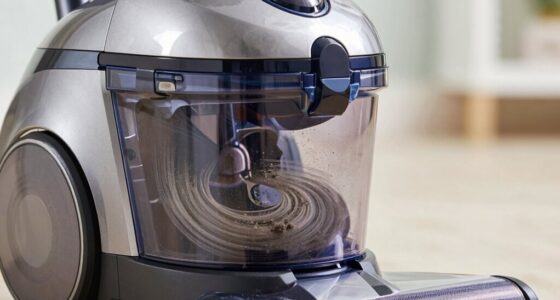
If your Dyson V15 Detect™ Origin Cordless Vacuum keeps pulsing on and off, it can be frustrating and reduce cleaning efficiency. This common issue typically stems from blockages, filter problems, or battery concerns. Fortunately, you can resolve this yourself with some straightforward steps, ensuring your vacuum works smoothly again.

Get cleaning gear delivered free with Prime
- Fast, free delivery on millions of items
- Prime Video, Amazon Music and more included
- Member-only deals all year
Below is a detailed guide on how to troubleshoot and fix this pulsing problem safely and effectively.
Key Takeaways
| Check for blockages | Clear obstructions in the wand, brush bar, and intake to restore airflow. |
| Inspect filters | Clean or replace filters to maintain optimal suction and prevent overheating. |
| Battery and power issues | Ensure battery connections are secure and the vacuum is charging properly. |
| Maintenance reminders | Regular upkeep prevents pulsing and prolongs vacuum lifespan. |
Step 1: Power Off and Unplug
Before beginning any troubleshooting, turn off your Dyson vacuum and unplug it from the charger. This ensures safety and prevents accidental activation during inspection.
Step 2: Check for Blockages
- Detach the wand and cleaner head from the main body.
- Inspect the wand, cleaner head, and hose for debris or obstructions.
- Remove any visible blockages carefully, ensuring no debris remains.
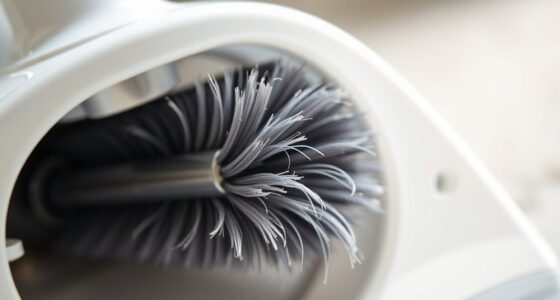
- Check the brush bar to see if tangled hair or debris is causing issues and clear as needed.
Step 3: Clean or Replace Filters
Dirty filters can cause overheating and pulsing. Remove the pre-filter and main filter from the vacuum (as per your model’s instructions). Rinse filters under cold water until clean, then let them air dry completely before reinstalling. If filters are damaged or excessively worn, replace them with compatible filters like the 3Pack Pre Filters Replacement.
Step 4: Check Battery and Connections
Ensure the vacuum’s battery is properly seated and charging. If the vacuum is not charging correctly, try cleaning the charging contacts with a dry cloth. If issues persist, the battery might need replacement or professional repair.
Step 5: Reset and Test
After cleaning filters and checking for blockages, turn on the vacuum to see if the pulsing issue persists. If it does, perform a reset by turning off, removing the battery (if removable), waiting a few minutes, then reattaching and powering on again.
The Products in This Guide

Dyson V15 Detect™ Origin Cordless Vacuum
- ✔ Color: Origin
- ✔ Charge Time: 3.5 hours
- ✔ Warranty: 2 years

LANMU Crevice Tool Vacuum Attachments Compatible
- ✔ Length: About 10 inches
- ✔ Compatibility Notes: Not fits V6 or canister models
- ✔ Material: High-quality plastic
Dyson V15 Detect™ Origin Cordless Vacuum
The Dyson V15 Detect™ Origin Cordless Vacuum offers powerful, intelligent cleaning with advanced features that help detect and remove dust effectively. Its LCD screen displays useful maintenance alerts, making troubleshooting easier.
Pros:
- Powerful suction
- Intelligent debris detection
- Long battery life
- Versatile cleaning modes
Cons:
- Higher price point
- Heavier than some competitors
- Requires regular filter cleaning
Best for: Deep cleaning homes with pets and hard surfaces.
Not ideal for: Light, quick cleanups or small apartments.
Bottom line: A powerful, smart vacuum that tackles deep cleaning with ease.
LANMU Crevice Tool Vacuum Attachments Compatible
The LANMU Crevice Tool Vacuum Attachments compatible with Dyson models helps reach tight spaces, perfect for cleaning corners, car interiors, and between furniture. It enhances your vacuum’s versatility and ensures thorough cleaning.
Pros:
- Narrow nozzle design
- Compatible with many Dyson models
- Easy to attach
- Ideal for detailed cleaning
Cons:
- Extra attachment to keep track of
- May require adjustment for different models
Best for: Cleaning tight corners, car interiors, and hard-to-reach areas.
Not ideal for: Large debris or deep carpet cleaning.
Bottom line: A handy accessory for detailed cleaning in tight spaces.
Frequently Asked Questions
Why does my Dyson vacuum pulse on and off?
This often indicates blockages, dirty filters, or overheating. Troubleshooting airflow and filter issues typically resolves the problem.
How often should I clean the filters?
It’s recommended to rinse filters every 2-3 months and replace them if they show signs of wear or damage.
Can I use any filters with my Dyson?
Use filters specifically designed for your Dyson model, like the 3Pack Pre Filters Replacement, to ensure proper fit and performance.
What should I do if cleaning filters and removing blockages doesn’t fix the pulsing?
Check the battery connection and charging status. If issues persist, contact Dyson support or a technician for further diagnosis.
Keep Your Dyson Performing at Its Best
Regular maintenance and prompt troubleshooting can prevent pulsing issues and extend the life of your Dyson cordless vacuum. By following these steps, you can restore optimal performance and enjoy efficient cleaning every time.
Affiliate disclosure: As an Amazon Associate we earn from qualifying purchases. Prices and availability are accurate as of the time of publishing.
Halloween Picks
halloween
As an affiliate, we earn on qualifying purchases.