If your Dyson V15 Detect™ Origin Cordless Vacuum is pulsing on and off during use, it can be frustrating and hinder your cleaning. This common issue often relates to blockages, filter problems, or battery concerns. Fortunately, with a few simple steps, you can troubleshoot and resolve the problem safely, restoring your vacuum’s powerful, intelligent cleaning performance.

Get cleaning gear delivered free with Prime
- Fast, free delivery on millions of items
- Prime Video, Amazon Music and more included
- Member-only deals all year
Below, you’ll find clear, step-by-step instructions, tips, and warnings to help you fix your Dyson vacuum effectively without risking damage or voiding your warranty.
Key Takeaways
| Check for blockages | Blockages in the wand or cleaner head can cause pulsing. |
| Inspect and clean filters | Dirty filters reduce suction and can trigger pulsing. |
| Examine battery and connections | Loose or faulty battery connections may cause power fluctuations. |
| Ensure proper assembly | Incorrect assembly can disrupt airflow and trigger pulsing. |
Step 1: Power Off and Unplug
Before troubleshooting, turn off the vacuum and remove it from the charging dock. Ensure the vacuum is completely powered down to prevent accidental activation during inspection.
Step 2: Check for Blockages
- Detach the wand and cleaner head from the main body.
- Inspect the wand, cleaner head, and hose for visible debris or obstructions.
- Remove any blockages carefully to restore airflow.
Blockages can cause the vacuum to pulse as it struggles to maintain suction.
Step 3: Clean or Replace Filters
- Remove the pre-filter and main filter according to your model’s instructions.
- Rinse the filters under cold water until clean; do not use soap or brushes.
- Allow filters to air dry completely—preferably overnight—before reinstalling.
- Replace filters if they are damaged or excessively dirty.
Dirty filters significantly impair suction and can cause pulsing behavior.
Step 4: Check Battery Connections and Charging
Ensure the battery is seated properly in the main body and that the connections are secure. If your vacuum uses a removable battery, try removing and reseating it.
Additionally, verify that the charger and charging port are clean and functioning correctly. A faulty connection or low battery charge can lead to power fluctuations and pulsing.
Step 5: Reassemble and Test
Reattach all parts securely, ensuring the wand, cleaner head, and any attachments are properly connected. Turn on the vacuum to see if the pulsing issue persists. If it continues, proceed to a deeper inspection or professional servicing.
The Products in This Guide

Dyson V15 Detect™ Origin Cordless Vacuum
- ✔ LCD Display: Shows particles, modes, alerts
- ✔ Cleaner Heads: Deep cleans all floor types
- ✔ Runtime: Up to 60 minutes

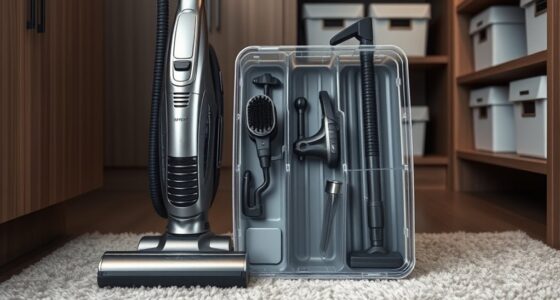
LANMU Crevice Tool Vacuum Attachments Compatible
- ✔ Nozzle Width: Approx 1.2 inches
- ✔ Material: ABS plastic
- ✔ Flexibility: High
Dyson V15 Detect™ Origin Cordless Vacuum
The Dyson V15 Detect™ Origin Cordless Vacuum offers unmatched suction, intelligent debris detection, and a variety of cleaning modes. It’s designed for whole-home deep cleaning and easy maintenance, making it a top choice for pet owners and allergy sufferers.
Pros:
- Powerful suction with 100% more power
- Intelligent debris detection
- Long 60-minute runtime
- LCD screen for real-time data
Cons:
- Premium price point
- Weight may be heavy for some users
- Filter maintenance required regularly
Best for: Deep cleaning homes, pet hair removal, allergy sufferers
Not ideal for: Light, quick cleanups, or for those preferring corded vacuums
Bottom line: A powerful, smart vacuum ideal for thorough, whole-home cleaning.
LANMU Crevice Tool Vacuum Attachments Compatible
The LANMU Crevice Tool Vacuum Attachments seamlessly fit Dyson models and help you reach narrow spaces, corners, and tight areas for detailed cleaning of sofas, car interiors, and baseboards.
Pros:
- Narrow nozzle for tight spaces
- Compatible with many Dyson models
- Flexible, slim design
- Easy to attach and use
Cons:
- Not compatible with V6 or canister models
- May require additional accessories for full compatibility
Best for: Cleaning tight corners, car interiors, and delicate spaces
Not ideal for: General surface cleaning or large debris removal
Bottom line: A helpful attachment for reaching those tricky spots in your home and car.
Frequently Asked Questions
Why does my Dyson vacuum pulse or cycle on and off?
This often indicates airflow blockages, dirty filters, or battery issues. Follow the troubleshooting steps to identify and fix the cause.
How often should I clean or replace the filters?
It’s recommended to rinse and air dry the filters every 2-3 months, or when visibly dirty, to maintain optimal suction.
Can I fix the pulsing issue myself?
Yes, most causes like blockages or dirty filters are simple to resolve with basic maintenance. If the problem persists, seek professional service.
Is it safe to clean the filters with water?
Yes, rinsing filters with cold water is safe. Ensure they are completely dry before reinstalling to prevent damage or mold growth.
Restore Your Dyson’s Power and Performance
With these troubleshooting steps, you can effectively address the pulsing issue and keep your Dyson V15 Detect™ Origin operating at peak performance. Regular maintenance, such as cleaning filters and checking for blockages, will extend the life of your vacuum and ensure consistent cleaning power. If problems persist despite these efforts, professional servicing may be necessary to diagnose potential hardware issues.
Affiliate disclosure: As an Amazon Associate we earn from qualifying purchases. Prices and availability are accurate as of the time of publishing.
Fall Picks
fall essentials
As an affiliate, we earn on qualifying purchases.